Templates
3D Simple: cinematic motion graphics rendered in code
What the 3D Simple template in Motion Fab can do: glowing lines, sparks, 3D objects and glass, shaders, bloom and film grain. Example videos, 22 effects, transitions and prompt tips.
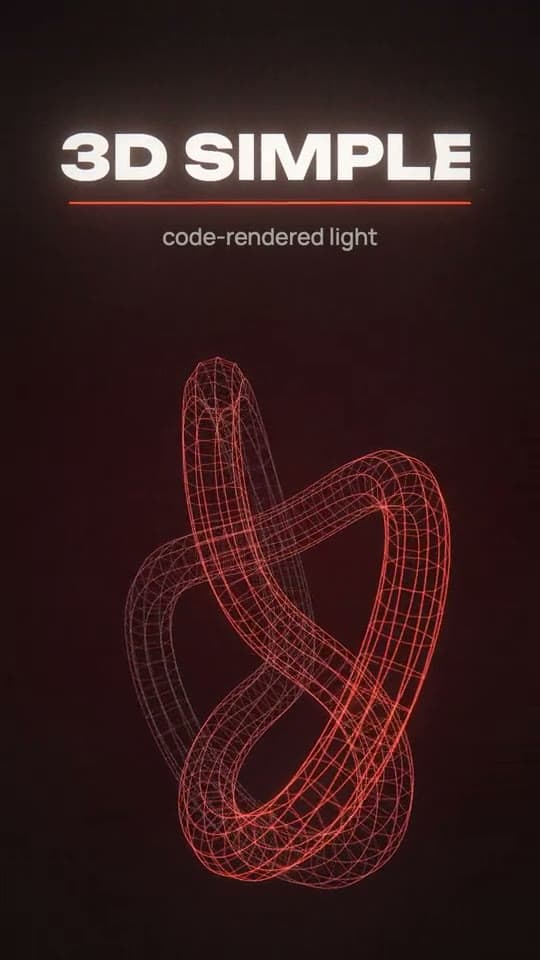
3D Simple is the Motion Fab template for videos that hit hard: glowing lines, sparks, particles, 3D objects and glass, shaders, bloom and film grain. An engine draws every frame right in the browser, the way music videos and title sequences are made — only from your description in a chat.
How it works
- Describe the idea or the mood. It can be short — "make something awesome for the launch" — with photos, footage or a logo attached.
- A sketch. The agent quickly shows every scene with its text, no effects or sound yet, and asks once what to generate with credits: music, 3D models, video clips. Free music composed in code needs no yes.
- The full version. After your yes, the agent makes the whole video: effects in every scene, bloom and grain, flashes and punch-ins on the hits, a transition on every cut, music and sound effects.
- Edits. Type in the chat, pick options in the panels or tap a ready button: "Make it more dynamic", "Add sound", "Another take".
- Export. A regular MP4 or an HDR video. A failed export costs no credits.
The first full version goes all in. The agent doesn't start with a plain animation for you to improve: people pick this template for its effects, so it uses them right away.
Examples from the catalog
Both videos were made in 3D Simple from a single prompt. Open the prompt, swap in your own words and run it.
A chrome 3D title
Thick chrome letters with bevelled edges on a glossy floor with reflections. A riser, silence before the drop, the hit — and the title slams in, a glint runs across the metal, then the letters twist into a spiral of sparks. About eight camera angles, each landing on the beat of a 124 BPM techno track. The prompt.
A glass knot that loops without a seam
A phrase types out like a prompt, scatters into glowing dots, and they gather into a crystal knot with rainbow edges. A shockwave, a flash, a push-in — then everything is pulled into a red-hot point and the video starts over. A loop like this suits a card on a website. The prompt.
22 ready effects
The engine comes with a library of ready effect scenes. The agent picks them by what a scene says: a number gets the counter, growth gets a branching tree, a product goes under a scan or into glass. Here are some of them:
Sparks and embersA shower of sparks under the word, rising embers
Burning fuseFor a countdown or a launch
CounterNumbers roll like an odometer
100,000 cellsA huge grid spells the words
Gravitational lensWords or a photo bend around a black hole
Text into dotsWords crumble and form a 3D shape
X-ray scanA scan band reveals what is inside
Flow linesThousands of lines spiral into a well
ShockwavesThe word slams in, rings blast out on the beat
The library also has a ray field, a signal through a diagram, a plucked string, a chart drawn by a spark, a tile wave, a grid to the horizon, a gravity well, text on a 3D ring, an engraved object, contour lines, an oscilloscope, branching growth and a light in haze. Beyond the library, the agent writes its own scenes and shaders.
Transitions
3D Simple has no bare cuts: every scene change lands on a beat and gets its own transition, never the same one twice in a row. The agent saves the loud ones for the moments that matter.
Burn-throughThe frame burns away to the next
Infinite zoomA dive into a recursive spiral
Convergence warpEverything is sucked into the centre
IrisA white-hot ring opens the next scene
GlitchThe picture breaks into slices
CRT power-offThe picture collapses into a line
There are 13 transitions in all; the rest are scene inside a scene, smear, zoom-through, light wipe, white flash, invert hit and soft crossfade.
So that a new take doesn't repeat the last one, the agent keeps an effects journal. When you tap "Another take", it gives every scene a technique and every cut a transition the video hasn't used yet.
3D objects and glass
- Simple forms — a box, a sphere, a torus, metal — the agent builds right in the scene.
- Glass — crystal with rainbow edges, frosted glass, bubbles, liquid, and text behind glass that refracts.
- A word or logo in 3D — extruded letters with bevelled edges, bent and multi-part forms, morphs and shatters. The agent models these with a script in Blender.
- Your product from a photo. From a photo of an object, the agent makes a textured 3D model, which can then sit inside a glass cube, for example.
- A character that moves. The agent rigs a 3D model of a person or a robot and gives it animations: running, jumping, dancing, gestures.
Your photos and footage, inside the effects
In 3D Simple your material isn't a slideshow under the effects — it becomes part of them. The same engine draws photos and footage, so bloom, grain, flashes, punch-ins and transitions apply to them too.
- A photo can push in slowly, lie on a plane in 3D under a camera move, or pass under a light sweep. Lines and sparks can trace its shapes.
- The agent cuts the subject out of a photo, and glowing lines pass behind it.
- The agent cuts footage into 1–3 second shots on the beat and joins them with transitions.
- A person in the shot can be separated from the background, so effects and glowing type sit between the background and them.
Light and film
- Glow and film: bloom, halation around bright spots, grain, vignette, chromatic aberration. There are ready presets and sliders.
- Palette: ready palettes or your own main colour.
- Hits on the beat: flashes, punch-ins, a shake on the biggest moment, inversion.
- Motion blur: on export the engine averages several sub-frames per frame, like a real camera.
- Shaders — fullscreen GLSL scenes: a glowing tunnel, an iris transition, waves of light. The agent can adapt a shader from Shadertoy when its licence allows.
Panels and quick buttons
Seven panels: pick the options, tap Apply, and the agent gets a precise task.
- Look — glow and grain presets, sliders, the palette and your own colour.
- Motion — energy, hits on the beat, cut rate, camera, motion blur.
- Sound — the music's mood and tempo, the climax, sound effects.
- Voice-over — the script, language, voice and pace; fit the scenes to the voice or the voice to the video.
- Effects — the 22 effects and the transitions with live previews: add one as a new scene, replace a scene or use it as a background.
- Text — how text appears, the font, size, case and colour.
- 3D object — a word, your logo or a form in 3D: material, motion, where it goes.
And three buttons with no settings: "Make it more dynamic" — more cuts and hits on the beat, punchier transitions; "Add sound" — music and effects that line up with the hits; "Another take" — the same text and palette with new ideas for the scenes.
Sound and voice
- Always music. Your track, or one generated for the video's mood and length. If you'd rather not pay for generation, the agent composes music itself, in code. Flashes and punch-ins sit on that music's beats.
- Sound effects on every hit and transition: impacts, whooshes, a riser into the drop.
- Voice-over with an ElevenLabs voice. The music ducks under it.
How to write a good prompt
Describe:
- Format and length: "vertical, 15 seconds".
- The scenes in order: what glows and moves in each — lines, particles, shapes, kinetic type.
- The camera: push-ins, orbits, angle changes.
- Palette and light: bloom, grain, flashes, blur.
- Text on screen — in quotes, as examples you can replace later.
- Music and hits: the tempo and which moments line up with the cuts.
For example:
A 15-second vertical teaser for the launch of an app called Pulse. Almost black background, one acid-green accent, soft bloom and grain. 1) In the dark, a spark runs under the word "Soon" and sets it alight. 2) A counter rolls up to "10,000" with the caption "on the waitlist". 3) My logo from the photo, in 3D, inside a glass cube, with a scan passing over it. Electronic music at 128 BPM, the drop on the third scene, a flash and a punch-in on every cut.
Or keep it short: attach a photo and write "make it look amazing" — the first version will still come with effects, transitions and sound.
Formats, export and price
- Frame: vertical 9:16 for 15–30 seconds by default; 16:9, 1:1 and other lengths work too.
- Export: MP4 in 1080p or true 4K — the engine draws the frame at twice the resolution. A separate HDR export (HLG) is there for bright screens.
- Fonts: 11 template fonts and the 55 families of the font library, most of them with Cyrillic.
- Price: the template is free. Credits pay for the agent's work, for generated music, voice, 3D models and clips, and for exports. You start with 300 credits, no sign-up needed, then the free balance refills to 100 every month.
How 3D Simple differs from Simple Motion
Simple Motion builds graphics from type, shapes and transitions. It suits clean, clear videos: explainers, promos, flat graphics. 3D Simple draws light: glow, sparks, glass, depth and film. Pick it when the video has to impress — a teaser, an intro, a clip.
The template's engine grew out of the renderer of the music video "I'm Upping My P(doom)" by Giacomo Magnanini (MIT licence).
Describe the video. The agent animates it.
Motion graphics from your description in chat: kinetic type, 3D effects and sound.